Showing posts with label Math. Show all posts

Monday, June 09, 2014

Review: Learning Wrap Ups

I find myself keeping an eye out for things that will occupy my younger boys during school time.  I was thrilled when the opportunity to review these products (perfect for grades K-5th) from Learning Wrap ups:


Learning Palette


As you can see, the Learning Palette base is a yellow disk with 12 smaller colored disks that fit around the circle.  Some of the colored disks are solid, and some have holes punched out of the middle.  The question cards fit over two posts on the front of the disk (the two posts keep the question card from spinning).  The center post allows for a plastic cover to be screwed on to hold all the disks in place so they aren't lost while the Learning Palette is being stored.

The student places the card they are working with on the Learning Palette.  On the front of the card are questions, with a solid colored dot or a colored dot with a hole in it next to the question.  The student answers the question by placing the correct disk next to the answer.  For example, on one card in my reading kit, the student is looking for synonyms.  The word "companion" has a green dot with a hole in it next to it, so the student would place the green disk with a hole in it next to the word "buddy".

To check the answer, the student flips the card over and places it on the two posts.  The student is able to quickly check the answers by looking at the colored bar next to the disks they placed for their answer.
 
  • Numeration:  Whole Numbers
  • Numeration:  Fractions
  • Numeration:  Decimals and Percent
  • Algebra Concepts
  • Geometry & Measurement
  • Probability & Statistics
3rd Grade Reading 1 Base Center Kit topics:
  • Synonyms, Antonyms, & Homophones
  • Vocabulary
  • Grammar
  • Prefixes and Suffixes
  • Reading Comprehension

Each topic for both math and reading contain 144 challenges (12 cards with 12 questions per card).  There are kindergarten through 5th grade levels available for math, and kindergarten through 3rd grade levels available for reading.

In addition to the physical Learning Palette, there is an online program available.  LearningPalette.com gives your child access to all the levels of both reading and math, and works much the same way as the physical product.  The same types of discs are available for your student to drag and drop to answer the questions.  Answers can be checked by clicking a "check answers" button, and the disks they've placed are marked with either a red x or a green checkmark.


 
Wrap ups


In addition to the Learning Palette, I also received two kits of Learning Wrap ups.  Learning Wrap ups look like large plastic keys.  They are made of a sturdy plastic, and each set is held together with a plastic rivet, so your student can spin whichever key they are working on out.  There is a string attached to each set.  To answer the questions, the student places the string into the first slot on the left-hand side, and then wrap the string to the answer on the right-hand side of the key.  The student continues down the question side of the key, until they've answered all the questions.  To check the answers, the key is flipped over.  There is a raised pattern on the back of each key, and if the string matches the pattern the student knows the answers are correct.
 
Learning Wrap up Vocabulary Intro Kit:
  • Synonyms
  • Homonyms
  • Compound Words
  • Antonyms
 
  • Addition
  • Subtraction
  • Multiplication
  • Division
  • Fractions
We also received 10 Steps to Addition Mastery Wrap up and Book Combo and 10 Days to Multiplication Mastery Wrap up and Book Combo.  These books are used in conjunction with the corresponding Wrap up to help the student master multiplication and addition.  There are pages that use the Wrap up to help the student increase their speed, pages, review pages, word problems, and other activities.  The student keeps track of the facts they've learned, and by the end of the book they will have mastered addition or subtraction facts.


I like the fact there aren't any grade levels listed.  One of the benefits of homeschooling is having your child work at his or her level, but many products make this difficult by clearly stating the grade level.  Jacob (6th), Micah (4th), and Nicholas (2nd) all worked with these products, both physical and the online program.  Because they are marked with levels instead of grade levels, this was not an issue-- for example, Nicholas was able to work on Reading skills using the Learning Palette at a level higher than his grade, and Micah was able to work right on grade level using the Level 4 Learning Palette for math practice.  Micah was also able to reinforce Reading skills using the Learning Palette below his grade level, and Jacob was able to reinforce Math skills by using the Learning Palette below his grade level.  And they all used the Wrap ups to work on various vocabulary and math skills.

LearningPalette.com is a great idea, though it still has a few bugs.  As their teacher, I can view their progress through my account.  It appears the bottom of the report is cut off, but I can't scroll down to see.  That said, Jacob, Micah, and Nicholas all enjoyed this program.  During the review period, Jacob was in bed sick with strep for 4 days.  I pulled up the LearningPalette.com website, handed him the iPad, and told him to play around with it.  He spent a good amount of time (in between naps) exploring and doing various cards, and he liked passing the time with it. 

Micah and Nicholas also spent time on the website and enjoyed it, though both enjoyed the physical products more.  Moving the physical pieces to the Learning Palette was a bit more rewarding for these active boys.

All three really enjoyed using the Wrap ups.  Again, the physical act of wrapping the string was rewarding, and they liked being able to flip the key over to check their answer.  Micah made it a point to tell me he enjoyed these products because he didn't have to write anything down.

I had Jacob work on the multiplication book.  He struggles with remembering math facts, and this was worth his time.  He liked that it was clear and uncluttered, and he likes using the keys alongside having to write things down.

When the boys have some time and I want to keep their brains engaged, these are fun to pull out.  They don't require much teacher time from me; I just explain what they are supposed to do if it isn't clear (mostly on the Learning Palette cards), and let them learn through play.  My favorite thing about all of the products that we received is that they are all self-correcting, and the boys can see right away if they are right or wrong.

All in all, these are high quality products, and they make a great addition to any elementary homeschool.  Go to LearningWrapups.com to see all the different levels offered, and use the code "HOMESCHOOL" to receive 20% off your order (use the same code at LearningPalette.com for 20% off the online program).


Click to read Crew Reviews


Crew Disclaimer

Tuesday, April 22, 2014

Review: CTC Math

I've mentioned before that I started working part time at the beginning of this year.  Since I'm home less often, I have less time to teach.  Therefore, I was excited to have the opportunity to review CTC Math.  We were given a subscription to the 12 Month Family Plan to review. 

CTC Math is an online math program for grades K-12.  The Family Plan provided access for up to 10 students.  There are 1,367 math lessons, along with 57,000 math questions.
There are 16 different courses you can choose from:
  • Kindergarten-6th grade math
  • Basic Math and Pre-Algebra
  • Elementary Measurement
  • Elementary Geometry
  • Algebra I
  • Algebra II
  • Geometry
  • Trigonometry
  • Pre-Calc
  • Calculus
Inside the different courses are different streams you can choose from.  In the kindergarten through 6th grade courses there are four different streams:  "Numbers, Patterns, and Algebra", "Measurement", "Space and Geometry," and "Statistics and Probability".  The other courses are broken down into either 2, 3, or 4 parts.

Inside the different streams are different topics.  This is where you'll find the lessons and problem sets.  You can either have your student work through all the lessons, or you can have them take the diagnostic tests provided for each topic.  By having your student take the diagnostic test, you can potentially skip lessons that your student doesn't need work on.

If you are looking for lessons on a particular topic, there is a search function that works pretty well.  If you type in a topic, such as division, it will bring up the lessons in the order they come up in the program.  You can play the lessons directly from the search window, or you can open the topic.

You can also pull up printable reports for each student.  There are summary reports and detailed reports.  The summary report lets you know how your students are doing overall, while the detailed report gives you a breakdown for how they're doing with each topic.  From the Parent's login, you have the option to change the percentage correct needed to pass a topic.

In addition to the lessons, there is also a "Speed Skills" option.  From this button, your student can work on the speed at which they can answer math facts.  There are 4 different levels, and the four basic operations are covered (single and multi-digit), along with division with a remainder and order of operations.
 
 
CTC Math Review
 
 
Using this program is fairly straightforward.  The student watches a lesson online, and then completes the problem set, and I used this program at grade level with my 6th, 4th, and 2nd grade sons.  I had them begin with the first stream and topic for their grade levels and work through sequentially. 

All three of the boys told me at different times that they love the teaching and find it very easy to understand.  The teaching is done my Pat Murray, who is a father of 10.  They also enjoyed the fact that lessons are short.  They could complete a lesson and problem set in 15 minutes. 

I liked that I could easily glance (from any computer with online access) at what they were working on, when they last logged in, and how they were doing.  I also liked that they're able to continue to progress in math, even if I'm not always readily available to teach.  It's a huge bonus that they like the program as well, and it's great that they can take diagnostic tests so they don't have to do stuff they're already solid in.
 
The 12 Month Family Plan we received is currently available at a discounted price of $118.80 for homeschoolers.  As you can see below, there are several other pricing options available:
 
 
If you are looking for a solid, complete math program for any student in your homeschool, make sure you check out the parent and student friendly CTC Math.
 
CTC Math Review
 

Check out CTC Math on Facebook:  Facebook CTC Math


Click to read Crew Reviews


Crew Disclaimer

Monday, March 10, 2014

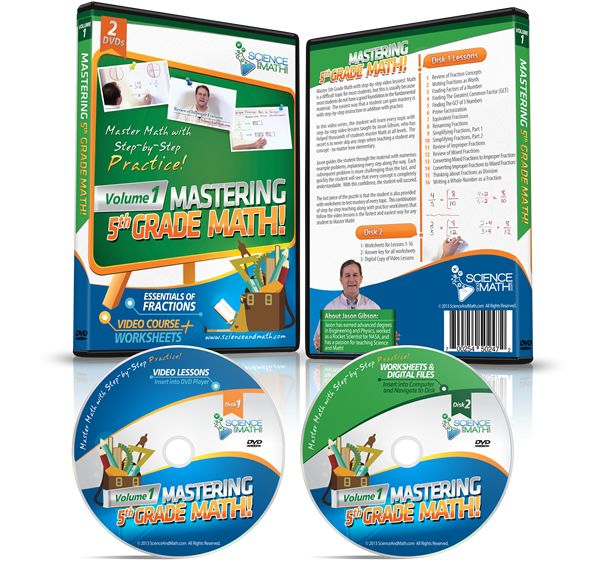
Review: Mastering 5th Grade Math-Volume 1-Essentials of Fractions

ScienceandMath.com is a company that offers a variety of math and science teaching DVDs.  In 2012, I had the opportunity to review their Amazing Science Volume 1 DVD, and I loved it so much I was thrilled when I was given the opportunity to review one of their math DVDs:  Mastering 5th Grade Math-Volume 1-Essentials of Fractions.  The target grade levels for this DVD are grades 4-6, and it's priced at $15.99.


Like many other homeschooling moms, I feel like I can never get enough math help.  I also like it when my boys are able to learn from other teachers.  Teachers on DVDs don't lose their patience or grow tired of explaining a concept again.  Enter Jason Gibson, a man passionate about teaching science and math. He's an actual Rocket Scientist who has degrees in Engineering and Physics.  He's been creating award winning videos since 2004, with the goal of explaining how science and math relate to one another.


There are 16 lessons on the Mastering 5th Grade Math-Volume 1-Essentials of Fractions DVD:
  1. Review of Fraction Concepts
  2. Writing Fractions as Words
  3. Finding Factors of a Number
  4. Finding the Greatest Common Factor
  5. Finding the GCF of 3 Numbers
  6. Prime Factorization
  7. Equivalent Fractions
  8. Renaming Fractions
  9. Simplifying Fractions Part 1
  10. Simplifying Fractions Part 2
  11. Review of Improper Fractions
  12. Review of Mixed Fractions
  13. Converting Mixed Fractions to Improper Fractions
  14. Converting Improper Fractions to Mixed Fractions
  15. Thinking about Fractions as Division
  16. Writing a Whole Number as a Fraction
Lessons seem to average about 15 minutes. In addition to each teaching video, there are printable worksheets included on a separate DVD (also included on this DVD are the lessons in mp4 format). There are about 2-3 worksheets per lesson, and there is also a printable answer key.  Each worksheet has 10 problems.  I appreciated the clean, uncluttered appearance of the worksheets, and the fact they are clearly labelled:


I used this with Jacob, my 6th grader.  He watched the DVD lessons on a laptop, and then completed the associated worksheets.  Fractions are not a new concept for him--just something he needed some extra practice/reinforcement with.  He completed about a lesson a day.  If fractions were a new concept, or if he were really struggling, I would have spread the worksheets out over a few days.  


I asked Jacob what he thought about the DVD, and he really enjoyed it.  He never complained about it, even though math tends to be his least loved subject.  He told me that he teacher was engaging and he enjoyed watching the lessons, and he thinks that Mr. Gibson explains fractions well.  Jacob feels like he understands some things about fractions better than before he completed the DVD lessons.  From grading Jacob's completed worksheets, he seems to understand the content well.

Mastering 5th Grade Math-Volume 1-Essentials of Fractions is the first of four volumes in this series.  The remaining 3 DVDs focus on adding and subtracting fractions, multiplying and dividing fractions, order of operations, decimals, long division, and more.  If you're looking for something to supplement your current math program, or if you have a student struggling with fractions, you should check out this DVD from ScienceandMath.com.


Click to read Crew Reviews


Crew Disclaimer

Saturday, September 28, 2013

Review: VideoText Interactive

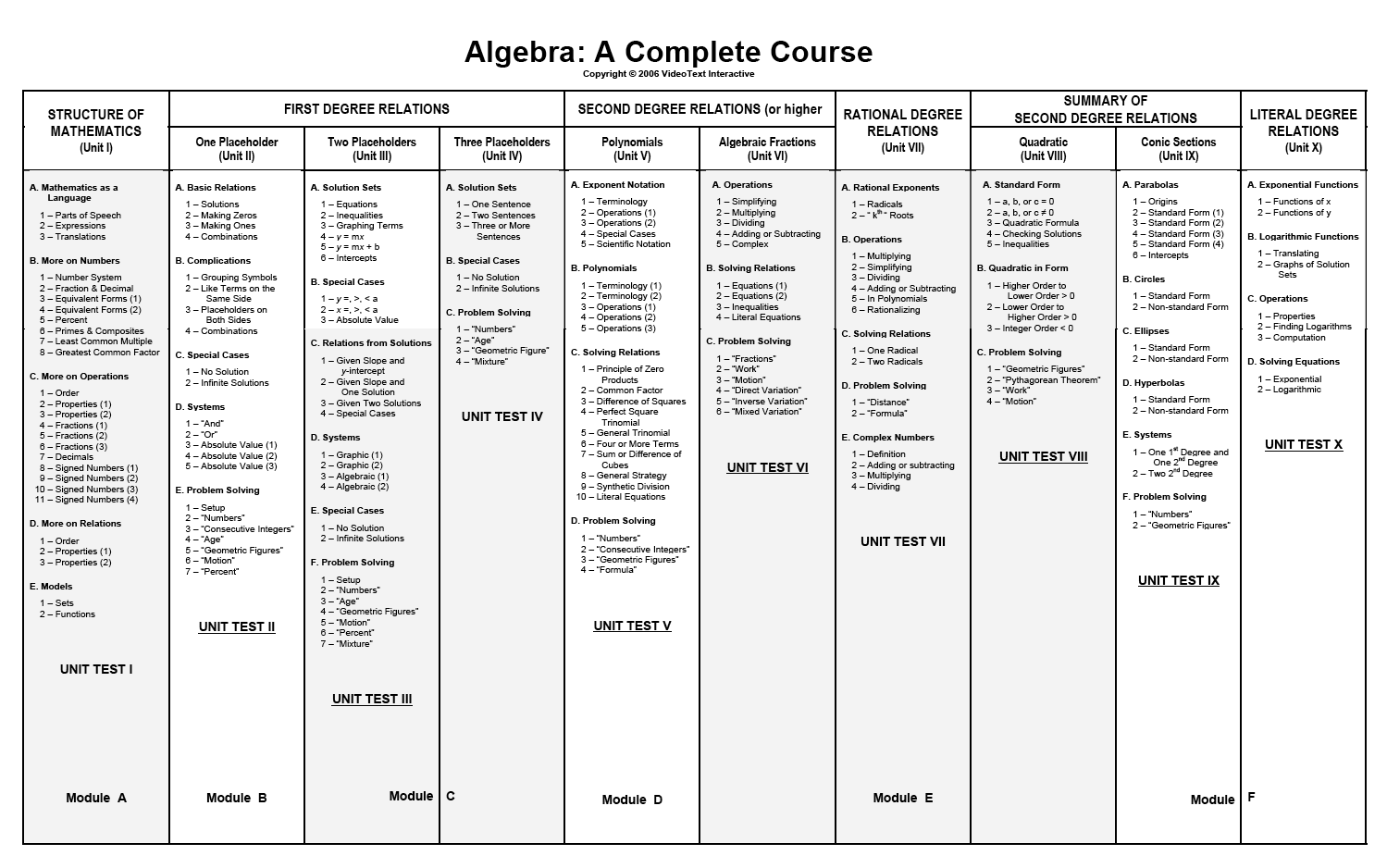
Algebra:  A Complete Course is an interactive math course from VideoText Interactive.  What makes it interactive?  Instead of the student having a traditional textbook, which may or may not have separate teaching DVDs, the teaching in this course is done through teaching videos with written notes as a backup.  I was given a 3 year subscription ($299) to the complete course for review.  This subscription includes access to all of the modules for two children.

 photo Algebra_productimage_zps6b262264.jpg


This course does not have a traditional scope and sequence.  As the title Algebra: A Complete Course might suggest, it covers PreAlgebra, Algebra 1, and Algebra 2.  The layout of each unit is meant to be a logical introduction to algebraic concepts.  Because of the scope and sequence, it is highly recommended that any student begin at the beginning.


It is generally recommended that you start this course in 8th or 9th grade, but if your child is younger and doing well in math you can consider starting it earlier.  You can start this course with your child when they:
  • can add, subtract, multiply, & divide whole numbers, fractions, and decimals
  • know how to convert fractions to decimals and decimals to fractions
  • know how percents relate to decimals and fractions
  • know a little bit about positive and negative numbers

Once subscribed, both student and instructor have an account.  The instructor account includes links to PDFs for all the course notes, worktexts, quizzes, tests, solutions, and instructor's guides.  The student account includes links for course notes, worktexts, and solutions for the worktext problems.  Both include links to the lesson videos.


Instructor Account

Student Account

There are specific steps for using this program, which includes 176 video lessons.  The first thing your student needs to complete for each new lesson is a quiz over the material learned in the previous lesson.  Once they take the quiz, you check the answers.  If there are any missed problems, your student needs to figure out where they went wrong and then they can receive partial credit.  Following the quiz, your student will watch the new lesson.  You are encouraged to watch the lesson with your child and pause the video when questions are posed and allow your child to answer.  After they watch the lesson, then they should teach the lesson back to you using the course notes.  Once this is completed and the lesson is understood, then the student works problems in the worktext.  The instructor checks the answers, and if any problems are missed the student needs to figure out the reason why.  There are plans for completing the program in 1, 2, or 3 years, but all follow the same basic framework.

I used this program with Ezekiel. I chose to print the worktexts and course notes for him, though this isn't necessary and you could have your student work directly from the computer screen.  We were both impressed with this program.  It really focuses on a mathematical understanding, not basic memorization.  I didn't receive a great math education in high school, and it was mediocre in middle school. I learned some whys that have eluded me for decades by watching these videos--there is a reason why we flip fractions and multiply in order to divide fractions!  Ezekiel enjoyed it as well.  When asked his opinion on the program, he said "I think the videos explain things well.  I liked that he showed relationships between math and language.  The first lessons were really easy and it only took about 20 minutes, but then it started taking about 45 minutes.  Overall, I look forward to continuing with it."

Still not sure?  Check out this sample lesson and supporting material.


 photo logo_zps6535dbd7.jpg

For more reviews of VideoText Interactive, visit the Schoolhouse Review Crew.


Photobucket

 photo Disclaimer2_zpsff718028.gif

Saturday, June 01, 2013

Review: Make It Real Learning (Math Mammoth)

I've been a fan of Math Mammoth for a few years now.  While we don't use it program as our main math curriculum, I love having it on hand for supplementing or a change of pace when we get stuck on a concept.  I've been interested in the Make It Real Learning books, but have never taken the plunge.  I was excited to have the opportunity to review three of these books:


The Make It Real Learning present real-life math problems to the students.  I know I spent a lot of time wondering when I'd use certain concepts when I was a student, and these books strive to answer those questions.  There are 22 books available, covering everything from basic arithmetic to calculus, and just about everything in between.

The Arithmetic I book (sample here) has the student use basic arithmetic to solve problems such as using bar graphs to compare country populations and calculating money amounts in order to determine if they have enough money to purchase what they want.

The Fractions, Percents, Decimals I book (sample here) uses Hershey's chocolate bar to teach adding and subtracting fractions, and shopping at a famous clothing store to help teach percents by determining sale price and tax.

The Sets, Probability, Statistics I book (sample here) uses a restaurant menu to teach the student how to determine the number of two-piece meal combinations that can be made, and to use probability to determine the likelihood of certain combinations of fruit snacks occurring in 5 bags.

The books are $4.99 each, and are available for download.  Answers are provided, though there is no teaching about how to do the concept being practiced. It is expected that the student will be comfortable enough with the concept that they can work through an application problem.  The problems in each of these books vary, and they do require thought.  I used these books with my 8th, 7th, and 5th graders, and I did find them to be a nice addition to our math curriculum.  I printed the books out, though they are PDFs that can be edited on a tablet or computer, if you wanted to go the paperless route.  It took us 30 minutes or so to work through the problems, and it was a nice change of pace from our regular math.  I thought I would be able to use the first book with my 3rd grader, but after looking it over I decided it would be too frustrating for him.  That said, I'd definitely recommend these books for middle and high school students.


For more reviews of Math Mammoth, visit the Schoolhouse Review Crew.


Photobucket


 photo Disclaimer2_zpsff718028.gif

Saturday, March 16, 2013

TouchMath Second Grade

TouchMath is a multisensory approach to early elementary math.  It was born out of the desire of an elementary school teacher, Ms. Janet Bullock, to help her students understand elementary math concepts.  There are levels available for Pre-K through Second Grade, and I was sent the Second Grade TouchMath program to review.


2nd photo 2nd_zps507a9062.jpg


The Second Grade program consists of 4 downloadable units ($59.95 each, or you can purchase all four for $199.95).  Each unit contains 6 modules.
  • Unit A focuses on adding and subtracting withing 50, including regrouping.  
  • Unit B focuses on adding and subtracting within 100, place value, and understanding multiplication.
  • Unit C focuses on adding and subtracting within 1000 along with a review of multiplication.  
  • Unit D focuses on time, money, measurement, data, and geometry.


1 2 photo 16713_10151610009699867_292008485_n_zps44f65cf4.jpg


In addition to the four units, I also received the following TouchMath manipulatives to use with the program.  These are all optional, and are not required to use the program.

The idea behind TouchMath is that each numeral is assigned a specific dot pattern (TouchPoints) that ties the concrete value of a number to the abstract written number.  For example, the number 2 has two TouchPoints that the student can see and count, and if using the manipulatives, feel.  Since each numeral has a consistent pattern, the student is able to move from the concrete to the abstract.

I used the Second Grade program with Nicholas.  Since this is a downloadable product, each unit needs to be printed (black and white).  Just to give you an idea of what is involved, Unit A is 239 pages long.  Each of the 6 modules in a unit include an overview, objectives, instructional strategies for the student pages, module review and test, and a monitoring record, along with all student activity pages.  You can download sample activity pages on the website.

It is suggested that you do math daily, and that you spend two to two-and-one-half times your chid's age doing math.  So for Nicholas, who is 7, they suggest we spend 14-18 minutes daily.

For a typical lesson, the teacher uses the Instructional Strategies provided to guide the student through the worksheets.  Throughout the lesson, the teacher is instructed to stop and make sure the student has a firm understanding of the concept being taught.  Then there are worksheets that are completed with guidance from the teacher, and finally there is independent practice.  We spent about 15 minutes a day on TouchMath, and we just worked until the time was up (instead of setting a stopping point based on completing a lesson).  Nicholas also spent time using the software a few times a week, which reinforces what is being taught in the program.  


So far, math seems to come naturally to Nicholas and TouchMath wasn't a great fit for him.  He didn't want to take the time to do math using the TouchPoints; at this point it was just an extra step slowing him down.  He did love the TouchNumerals with Base 10, and really enjoyed making up equations using the brightly colored foam numbers.  

However, I think TouchMath would be a great program for children who are struggling, or for a standard math student if you start from the beginning.  I think jumping in at the end with a student who has a firm grasp of numbers and how they work is why it didn't work for us.


logo photo touchlogo_zps5760f524.jpg


For more reviews of TouchMath (all levels), visit the Schoolhouse Review Crew blog.


Photobucket


Disclaimer:  I received a free copy of this product through the Schoolhouse Reveiw Crew in exchange for my honest review.  I was not required to write a positive review, nor was I compensated in any other way.  All opinions I have expressed are my own or those of my family.  I am disclosing this in accordance with the FTC Regulations.

Thursday, July 26, 2012

Math Essentials

Math Essentials is a math program for students working at a 4th grade level in math through algebra.  Books available are:

  • Mastering Essential Math Skills Book 1 (w/DVD)
  • Mastering Essential Math Skills Book 2 (w/DVD)
  • Mastering Essential Math Skills Pre-Algebra Concepts (w/DVD)
  • No-Nonsense Algebra (w/online lessons)
  • Decimals and Percents
  • Fractions
  • Geometry
  • Problem Solving
  • Whole Numbers and Integers


 I received Mastering Essential Math Skills Book 1 and Geometry to review.


Photobucket

Mastering Essential Math Skills Book 1 is the first book in this math series and is for grades 4-5 (table of contents).  Rick Fisher, the author of Math Essentials, is a teacher who developed this math system for use in his classroom to prepare students for algebra.  Lessons are short--20 minutes a day is all that is needed.  A DVD is included, and Mr. Fisher is the tutor.  He asks students to bring paper and pencil when they watch the DVD segment, and the student writes down the problems and works through the problems with Mr. Fisher.  After the DVD segment, the student works the problems in the workbook.  Each page is made up of review exercises, speed drills, helpful hints, problem solving, and problems based on the day's lesson.


Photobucket

In addition to Mastering Essential Math Skills Book 1, I received the Geometry book (table of contents).  This book doesn't come with a teaching DVD, but the lessons are similar to the lessons in Mastering Essential Math Skills.  Daily lessons begin with review exercises, then helpful hints (this is where the teaching occurs), problems based on the day's lesson, and problem solving.  Once again, lessons take only 20 minutes.

I used this program with Jacob, who is going into 5th grade.  I'll admit that I was skeptical about what he would think.  It's a very no-frills program; the DVD teaching isn't exciting, and the workbook pages are very utilitarian.  But he liked the program.  He enjoyed working through the practice problems with Mr. Fisher, and he really liked that the workbook pages took less than 20 minutes.  Priced at only $33.95 for Mastering Math Essentials Book 1 (including the DVD) and $11.95 for the Geometry book, it's an affordable option.


Photobucket


For more reviews of the Math Essentials program, go here.


Photobucket

Disclaimer:  As a member of the TOS Crew, I received this product, at no cost to me, in exchange for an honest review.  All opinions are mine.

Saturday, July 14, 2012

Professor B Math

Like many homeschooling families, we try to keep up with math over the summer.  There's nothing worse than starting a new year, pulling out the new math books, and realizing that your children forgot how to count.  Okay, maybe it's not usually that bad, but it's frustrating.  When the opportunity arose to review Professor B Math, I was happy to have a chance to use a different math with my boys.  I was given a 1 year subscription to review.  While I was given access to all 3 levels, I only used the first level.


Photobucket


Professor B covers three years of math in one year (about 10 months for the average student).  Students can begin as young as 3, but it is stressed that you start your child at the right level instead of going by grade.


Each level begins with a Table of Contents, and you choose the lesson you wish to complete.  The lessons are a series of slides, and the parent is supposed to read what Professor B says on the slide to the child.  There is no sound in the lesson.


Professor B steps the child through the lesson.  Concepts are broken down into very small chunks, and the child is supposed to work to mastery on each skill.  In addition to the online lessons, there is a printable workbook in PDF form for each level.

I had high hopes for this program, but it just didn't work for us.  I found it cumbersome and slow moving.  It was difficult to figure out where to place Nicholas, and the levels we did were a bit too easy.   Having to click through the slides and read each step to him was time consuming.

I do think this program would work well for children who are struggling in math or who need remediation.  The steps are broken down into very small parts, so the child wouldn't be overwhelmed with too much information at once.

Subscriptions can be purchased month to month.  They begin at $20/month, with discounts for each additional level purchased.  You may also purchase a 36 month subscription to each level for $100.  


Photobucket

For more Professor B Math reviews, go here.


Photobucket


Disclaimer:  As a member of the TOS Crew, I received this product, at no cost to me, in exchange for an honest review.  All opinions are mine.

Thursday, June 21, 2012

IXL

IXL is an interactive online math site for children of all ages.  It covers skills in pre-k through algebra, with more topics on the way, and can be used alongside any math program.  I received a one year subscription to review.  Subscriptions can be purchased yearly ($79/year) or monthly ($9.95/month).  Additional children are $20/year or $2/month.

When your child signs on to IXL, they (or you) can pick from any skill area in any grade to focus on.  It is wonderful to not be locked into specific grade level questions and problems.  There are over 2000 skills to choose from!  When you hover over a skill, a sample problem appears.  As the child works on skills, they earn virtual prizes.  The student can also click on the virtual prize board and work on the specific skill needed to uncover a virtual prize.  In addition to virtual prizes, they also can earn printable Achievement Certificates.

IXL Certificate of Achievement


The reports for the parent are wonderful. They allow the parent to look and see exactly where their child needs extra practice and what content their child has mastered.  Emails are also sent outlining your child's achievements.  IXL aligns to the common core standards for all 50 states, so it is easy to see and focus on areas that your child might need to work on.


IXL Family Reports


Micah spent most of his time on the time and money questions for 2nd grade.  This isn't his strongest area, yet he enjoyed practicing on the computer and earning awards.  I liked that I could easily keep him learning and engaged while I was working with his brothers.  


Photobucket

IXL is a fabulous program.  It's bright and colorful, yet not overwhelming.  It is a great supplement to any math program, or a wonderful way to keep your child's math skills sharp over summer break.  And since you can purchase subscriptions by the month or by the year, it's affordable for any situation.

To read more reviews of IXL, go here.


Photobucket


Disclaimer:  As a member of the TOS Crew, I received this product, at no cost to me, in exchange for an honest review.  All opinions are mine.